What’s lazier than lazy?

Writing a blog post on your mobile while your computer is 6 metres away.

Today I’ve been mobile surfing a lot and as I was thinking of turning on the computer and checking my Uni mail, I couldn’t be bothered! So here I am, thumbing away. Let’s see if I manage to upload a screenshot of this…

OK, can’t do that. I’ll have to upload the picture when I’m on the computer tomorrow. I wonder if there is a mobile-able blogging interface…

Here it is!

Blogging on the phone

Firefox the Nitpicker

Last night I installed the newest version of Firefox (2.0) and just now I noticed that it checks spelling in form fields!

What a wonderful feature! This might be a good reason to switch to using Firefox as my main browser (currently I’m preferring the good ol’ Mozilla). I had a list somewhere where I’d written reasons why I haven’t switched yet. I’ll have to look it up and see if something is still holding me back.

[edit Oct 31st]

There is at least one thing: I haven’t found a setting for “Autocomplete best match as you type” which is Mozilla’s Location Bar Autocomplete feature.

Also, why doesn’t it select a link when I search for text?

[/edit]

Robbie’s biggest album

I finally bought Robbie’s newest album, Rudebox, last night. It came out on Wednesday 25th (at least in Finland) but I couldn’t find the CD+DVD special edition in the two supermarkets that are close to work. On my way to a friend on Friday I finally went to a music store that had advertised the special edition plus a badge. Well, I never thought there’d be any badges left but I got one!

Rudebox badge

Had a bit of a “scare” when I thought I was starting to listen to the audio CD on the computer but no program was able to recognise the audio tracks. They started playing the DVD instead. I had taken a white disc from the slot with the booklet so I assumed it was the CD part. Well, no. The black one was the CD. I should’ve thought of checking the CD/DVD labels on the discs before freaking out.

It’s too early to love or hate the songs. I was too hasty to judge Tripping the last time so now I’ve learned from that mistake. I do know that Bongo Bong is wonderfully bouncy, and the two singles, Rudebox and Lovelight are alright, too. As a whole, the songs feel a bit too electronic to my taste.

Another bafflement is with the CD box. It’s noticeably wider than a regular CD. How am I supposed to store it?

Rudebox is too big!

(‘Scuse the blurriness, it’s difficult to balance one hand while crouching down and holding the CD with the other hand… And my hands aren’t very steady anyway.)

Intensive Care (previous album) has a paperboard wrapper around it and because of that I can’t fit it in the CD tower either. I suppose I need a separate box for Robbie CDs. Doesn’t matter though because my CD tower is flooding as it is. Could the next album be accompanied by a life-size cardboard Robbie, please?

Promotion to a superlative

This post is the first in my new category, PM.

I feel so special now. :)

Memory card acquired!

The 2 Gb memory card arrived today! I’m in the process of moving some nice music on it using PC Suite’s Music Manager. It’s not the best of programs, because it forgets all the songs it was supposed to transfer if something goes wrong, but it converts the songs conveniently to a correct format.

Quite funny to see how the number of pictures that still can be taken jumped from about 60 to over 2600. Very doubtful that I’d ever have even 60 photos (who knows) but why buy too little space when you can get plenty instead.

My computer isn’t liking the conversion process… It starts humming crazily around file number 5 (in queue) even though the CPU usage is not 100% and then calms down after a while. Could it be because the application starts converting the next file while transferring the previous one?

In 7th heaven on the 4th floor

Last night I had a Moment. It was a moment when I realised that what I do at work is really really fantastic (or should I say fah-bulous).

I’m not really talking about the technical stuff. It’s mostly pretty monotonous and, most importantly, only temporary. I do My Thing to the files and wish them well, and the projects go on living their lives I’ll never be a bigger part of (except when I get the files back and do My Other Thing before they’re sent to the client). But the projects I’m managing are really interesting! Of course, I can’t talk about them, which sometimes is a shame when I’m itching to tell about something great that happened at work and I can’t.

These Unspecified Fancy Operations make me feel very cutting-edge — which I’m not. But because I’m not, they feel very hip and groovy. (Convenient.) Anyway, it doesn’t matter what I do. It feels great to have settled in, found my place, and actually be excited about what I do. It takes one over the stressful times quite nicely, doesn’t it? (Today was pretty hectic, as a matter of fact.)

4th floor is the floor I work on. I’m one of the upstairs people.

Minna on the Road configured!

I invited myself to open a Google mail account (“Minna, Minna has invited you to open a Google mail account”), created a new account, and set it to allow POP usage. Then I took up on setting up the phone.

“Neat, a settings wizard!” I thought. I ended up using a Gmail account because Gmail was in the list of available providers. (Didn’t help though, but at least Gmail has good spam filtering.) I selected the outgoing server, email address, username, password… Then I fetched my mail. It worked. When I tried sending an email to thank Minna (that is, me) for the invite, the phone got stuck on “connecting to Gmail…” Then I thought, “well then, I guess I need to use the operator’s outgoing mail.” I set the outgoing server and encryptions, ports, things like that, and left the username/password empty (I don’t have a username/password. Unless they mean the un/pw for admin interface for the phone subscription which is not mandatory to register to). Then I tried sending the mail but it kept asking me for un/pw. Oookay.

Luckily I decided to google “email settings nokia n73” and found “Push E-mail (sort of) on Nokia N80 and N73” at Alex’s space. I would’ve commented and thanked for the instructions, but the comments were closed. Perhaps this thank-you will reach him. :)

I followed the instructions #2 and got very close to the solution. I only had to define port and security settings for incoming and outgoing mail, and then — like magic — the mail that was stuck in the outbox suddenly disappeared into the ether and travelled to my main Gmail account.

Long story short, now I have a working email account for my mobile phone!
Why do I need an email on my phone? I don’t know…

Update: I didn’t remember reading Anthony Pranata’s instructions on setting up a Gmail. There you can find screen shots of the process.

Speak of the dev… insurance

Just as I was about the travel insurance that I had paid for on the 11th but the papers hadn’t arrived yet. Today I received an envelope from the travel agency including a new Bunch o’ PapersTM along with a fancy schpancy black Traveller’s Safety Card. Hurraah.

Next step: waiting? And shopping for light (colour and fabric wise) clothes.

For the whole story, see category Tourist of Oz.

Binary shopping

I just ordered a 2 Gb miniSD card from an online store (I’ll pay it when I pick it up from the post office so I feel more secure with that). I had read good things about it.

Last Wednesday I paid for the travel insurance with the reference number I was asked to use — I haven’t heard anything from that yet.

We’ll see how they go.

Update Oct 28th
The insurance arrived the same day (Oct 17) and the memory card a week later (on Oct 24th).

Nokia N73 – My thoughts

Update on November 25. Added a bit about the game selection and joystick…

Today the package subscription finally started working and I can start using my phone for real. I’ve had a chance to play with it offline so this is what I think about it at the moment.

I think I should mention that this is my first S60 phone; my previous phones, Nokia 3210, 3330 and 6101 have been Series 40. (If that’s all gibberish, Forum Nokia has a nicely presented Device Specification section. Those two 3xxx phones I’ve had aren’t included, though.)

You navigate with a joystick that is located between the call start/end keys and the softkeys. It is quite easy to get used to the joystick even though at first it felt very weird. Pushing up is a little bit awkward still. Some have reported that the joystick has broken off — let’s hope that won’t happen to me. It does feel a bit flimsy, true, but I’m not planning on manhandling my phone.

I like the menu structure very much. It’s nice when there’s only a few options, the submenu pops on top of the main menu.
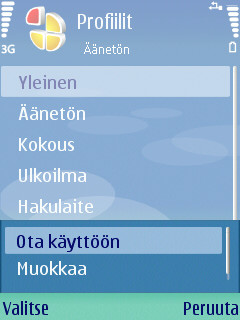
Screenshot of a submenu

(I’m using the default Nokia theme for the moment. I’ll have to look for a nicer, less blue, one.)

Also a nice feature is the tabbed menu. In many submenus e.g. Settings I can go to the next selection of settings by moving the joystick left or right.
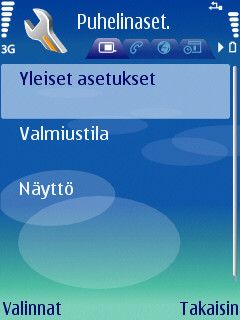
Tabbed browsing

The Active standby screen is heaven-sent! It shows the calendar, to-do list, currently playing radio channel or music track and probably much more. On my old phone I used calendar and other memo features, but only way to be reminded of the events was an alarm which I never use. Now I see current (a week ahead?) calendar entries right away!
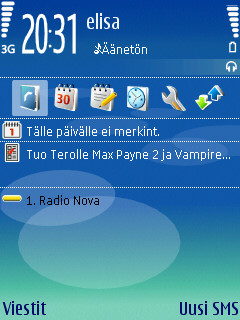
Active standby

(Yeah, I know there aren’t any calendar entries for this week. That doesn’t mean I don’t have any plans. Well, yeah it does, personally, but I have lots of work plans :) )

On the screen there is also a customisable list of six shortcuts.

Media key gives 4 more slots to customise shortcuts. I’ve chosen to have shortcuts to multimedia applications but it’s not restricted what you can have there. There is one grief with the Media key, though: it makes a sound when the view opens. I haven’t found any way to silence it except to use Silent profile.
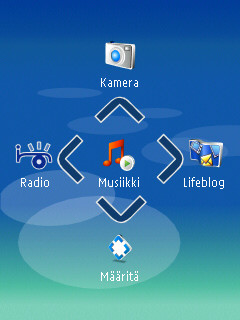
Multimedia key

There is only one game pre-installed. In some nooks of the world people get also Sudoku in addition to the Snake that is installed on my phone. Whyyyyy oh whyyyy can’t we have Sudoku installed? I could do without the weird 3D Snake (nothing beats the Snake II that was on e.g. Nokia 3330) but I love Sudoku!

The world clock is also a fancy feature. I’m sure I wouldn’t find it useful if I didn’t have a trip to Australia to look forward to…

World clock

A great tip was given by Harri in a comment on S60.com Blogs » S60 User Experience. He told that he uses a camera (digital or phone cam) for taking notes of for example timetables. Well, I took a photo of the timetable for buses from work. Now I only have to remember that I have the timetable easily available.

A great shortcut is that by pressing # you can switch between silent and default profile.

On the N73 support page there is an SMS Accelerator application and “it is recommended that you install this application to prevent slowness in SMS sending.” I sent my first SMS today and it left very swiftly so I’ll just have to wait and see what this alleged slowness is.

I’ve had a bit of a ‘Scuse me? moment. There are “My Folders” for messages but I haven’t yet figured out how to move messages to them (or anywhere for that matter). Today I finally received SMSs in my inbox so I can try if it really is difficult or I just didn’t have any moveable messages. (I could only move old messages to drafts so I think I’ll leave them on my computer and not move them to my new phone at all.)

Today I went shopping and bought the Music Headset of HS-20+AD-41. The AD-41 audio adapter has a 3.5mm plug for headphones so I can use any pair I like, but the HS-20 earphones are pretty good too. It has 3 (pairs of) ear pieces in different sizes and the smallest is actually small unlike with Koss’s Plug. It fits in my unnaturally small ear (or ear canal) very nicely. Now I only need to get a 1 Gb or 2 Gb memory card to get some music on the road. Before that I can always listen to the radio.

I also ordered my preferred Robbie ringtone (I’m not going to say what it is because I don’t want to hear it from any other phone than Mine! ;) ) so I’d say this phone is all set.

Screenshot application: Screenshot for Symbian OS (S60)

Some nice links
Nokia Nseries
S60 Blogs
S60 Tips

All S60/Nokia website tips are welcomed :-)